Efficiently Polling EV Battery Cell Voltages
When monitoring an Electric Vehicle (EV), you often need to track the voltage of every individual cell in the high-voltage battery pack. In many modern EVs, this can mean tracking 90+ individual cells.
The Problem: Polling 90+ individual PIDs one by one will flood the vehicle's CAN bus, potentially causing network collisions, and it will take several seconds just to complete a single update cycle.
The Solution: Many EVs group cell data into bulk PIDs (e.g., 32 cells per PID). Using the WiCAN Pro's forked firmware features, we can request these massive data blocks, output the raw multi-frame hex string to a single MQTT group topic, and let Home Assistant instantly slice and decode the data. This drastically reduces CAN bus traffic.
Phase 1: WiCAN Web UI Configuration
We will group three bulk PIDs together to capture all 93 cells and send them as a single JSON payload.
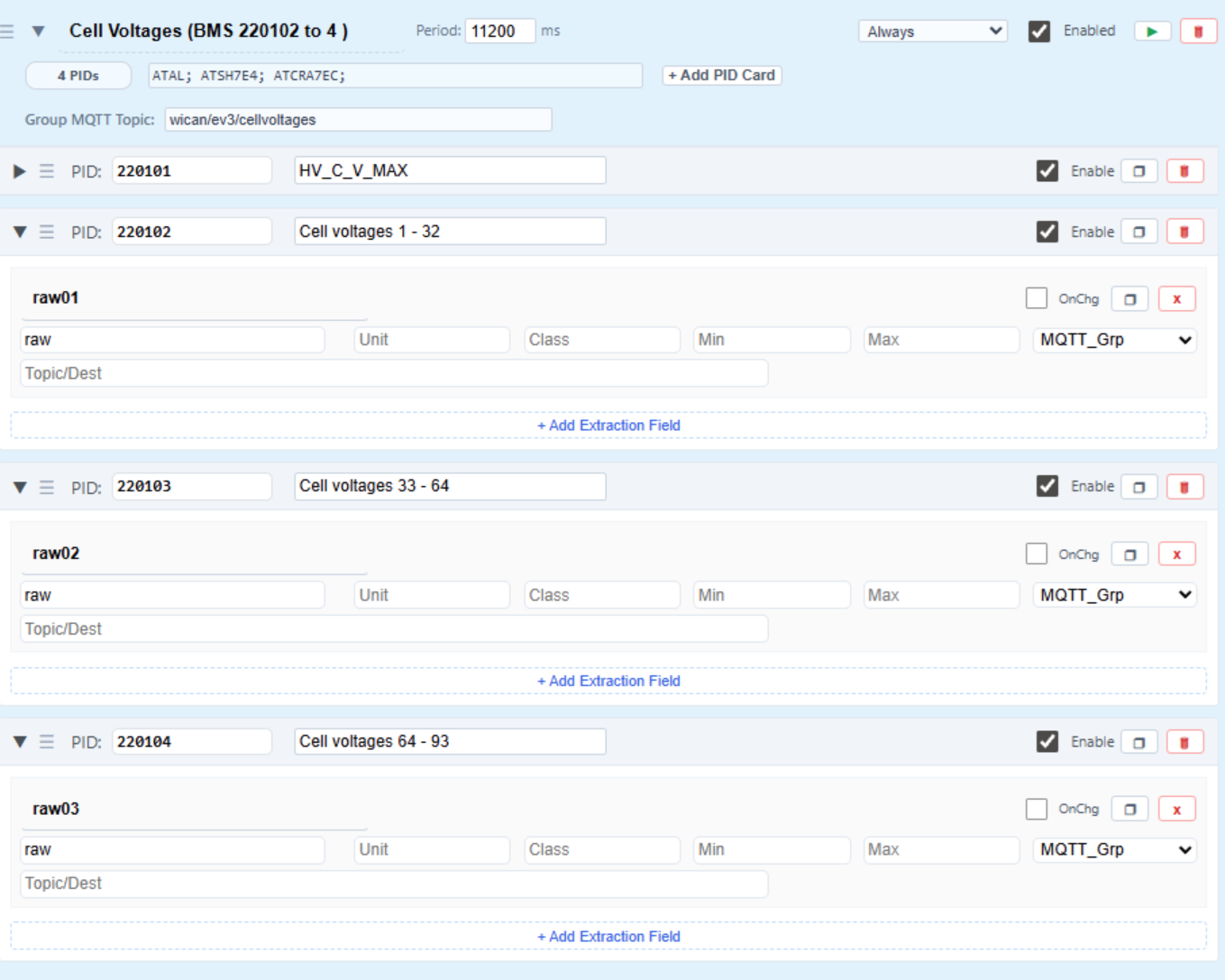
- Access the WiCAN Pro Web UI and navigate to Automate > Vehicle Groups.
- Click Add New Group and configure the header:
- Group Name:
Cell Voltages (BMS 220102 to 4) - Period:
11200ms (Polling every ~11 seconds is plenty fast for battery degradation/balance monitoring). - Init:
ATAL; ATSH7E4; ATCRA7EC;(Adjust based on your specific EV's BMS header). - Group MQTT Topic:
wican/ev3/cellvoltages
- Group Name:
- Add the PID Cards for your raw data blocks:
- PID 1:
220102| Name:raw01| Extraction:raw| Destination:MQTT_Grp - PID 2:
220103| Name:raw02| Extraction:raw| Destination:MQTT_Grp - PID 3:
220104| Name:raw03| Extraction:raw| Destination:MQTT_Grp
- PID 1:
!TIP You can also include standard math PIDs in this same group (like
HV_C_V_MAX) to capture the highest and lowest cell voltages pre-calculated by the BMS.
Phase 2: The MQTT Payload
Once saved, the WiCAN Pro will broadcast a consolidated JSON payload every 11 seconds. Instead of 93 individual messages, your MQTT broker receives one highly optimized payload containing the raw multi-frame hex strings.
{
  "HV_C_V_MAX": 4.02,
  "HV_C_V_MIN": 4.02,
  "HV_C_V_MAX_NO": 37,
  "HV_C_V_MIN_NO": 1,
  "raw01": "620102FFFFFFFFC9C9C9C9C9C9C9C9C9C9C9C9C9C9C9C9C9C9C9C9C9C9C9C9C9C9C9C9C9C9C9C9AAAA",
  "raw02": "620103FFFFFFFFC9C9C9C9C9C9C9C9C9C9C9C9C9C9C9C9C9C9C9C9C9C9C9C9C9C9C9C9C9C9C9C9AAAA",
  "raw03": "620104FFFFFFF8C9C9C9C9C9C9C9C9C9C9C9C9C9C9C9C9C9C9C9C9C9C9C9C9C9C9C9C9C9000000AAAA",
  "timestamp": 1778947870
}
Phase 3: Home Assistant Decoding (Jinja2)
Now, we configure Home Assistant to ingest these raw strings, slice the hex bytes, calculate the voltages, and assign them as attributes to a single sensor. The main state of the sensor will dynamically display the average cell voltage.
Add the following to your Home Assistant configuration.yaml under the mqtt: sensor: block:
    - name: "Wican EV3 HV Battery Pack"
      unique_id: "sensor.wican_ev3_hv_battery_pack"
      state_topic: "wican/ev3/cellvoltages"
      unit_of_measurement: "V"
      state_class: "measurement"

      # Calculates the average voltage across all parsed cells for the main state
      value_template: >
        {% set values = this.attributes.items() | selectattr('0', 'match', '^v\\d+') | map(attribute='1') | select('number') | list %}
        {% if values | length > 0 %}
          {{ (values | sum / values | length) | round(3) }}
        {% else %}
          {{ states('sensor.wican_ev3_hv_battery_pack') | float(0) }}
        {% endif %}

      json_attributes_topic: "wican/ev3/cellvoltages"
      json_attributes_template: >
        {% if value_json is mapping %}
          {% set ns = namespace(cells={}) %}

          {# Configuration for the three message blocks #}
          {% set blocks = [
            {'key': 'raw01', 'start': 1},
            {'key': 'raw02', 'start': 33},
            {'key': 'raw03', 'start': 65}
          ] %}

          {% for block in blocks %}
            {% if value_json[block.key] is defined %}
              {% set raw = value_json[block.key] %}
              {# Offset adjusted: Skipping the first 14 chars to catch the start of data #}
              {% set cell_data = raw[14:] %}
              {% for i in range(0, cell_data | length - 4, 2) %}
                {% set hex_byte = cell_data[i:i+2] %}
                {# Ignore padding 'AA' or 'FF' #}
                {% if hex_byte | length == 2 and hex_byte not in ['AA', 'FF'] %}
                  {% set cell_num = block.start + (i // 2) %}
                  {% if cell_num <= 93 %}
                    {# The math formula to convert the hex byte to voltage #}
                    {% set volt = (hex_byte | int(base=16, default=0)) / 50 %}
                    {% set key = 'v' ~ '%02d' | format(cell_num) %}
                    {% set ns.cells = dict(ns.cells, **{key: volt | round(2)}) %}
                  {% endif %}
                {% endif %}
              {% endfor %}
            {% endif %}
          {% endfor %}

          {{ dict(this.attributes, **ns.cells) | tojson }}
        {% endif %}
      device:
        identifiers: "wican-EV3"
        name: "wican-EV3"
        model: "wican pro"
        manufacturer: "meatpi"