Web Interface Overview
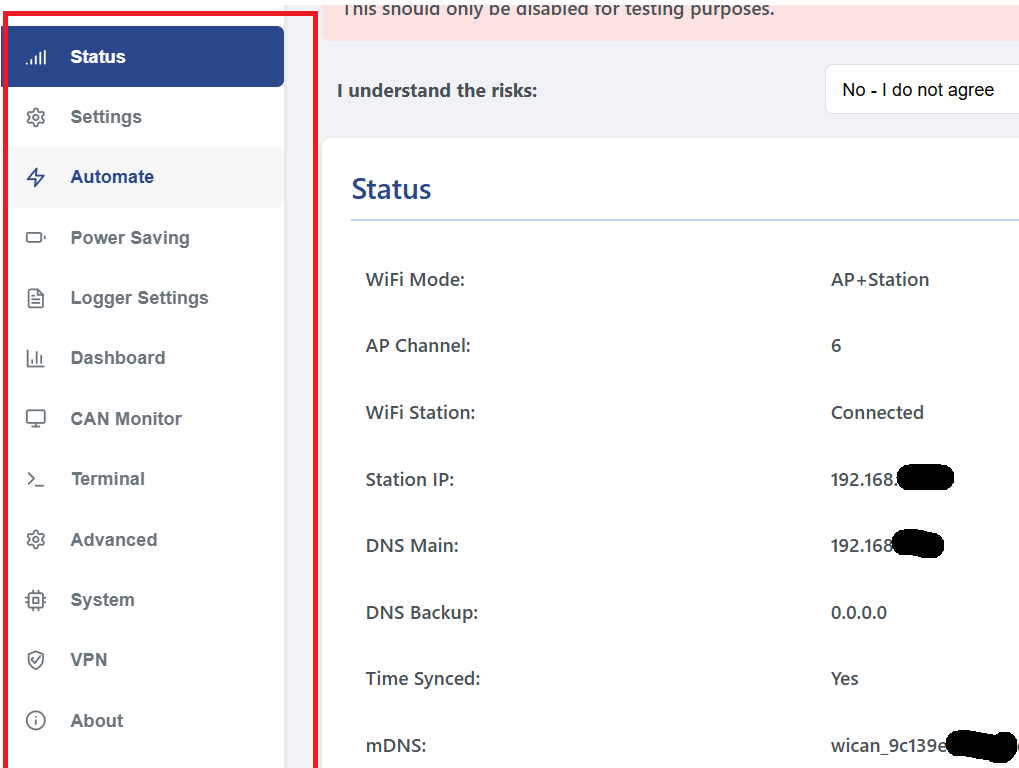
The WiCAN Pro provides a comprehensive web interface to manage your vehicle's data. Below is a detailed breakdown of each section found in the sidebar.
Core Configuration
- Status: The main dashboard for device health. Monitor live Wi-Fi signal strength (RSSI), MQTT connection status, system uptime, and the current real-time voltage of your vehicle's battery.
- Settings: The primary setup area. Contains sub-tabs for Wi-Fi (AP and Station), BLE (Bluetooth Low Energy), CAN (Protocol and Speed selection), and MQTT (Broker credentials and port).
- Automate: The telemetry engine. Use this to create or import Vehicle Profiles, organize PIDs into Groups with custom polling intervals, and set up Configured Destinations to route data to external services.
- Power Saving: Battery protection management. Set the Sleep Voltage (to prevent starting issues) and configure Wake-up intervals or CAN-bus activity triggers to bring the device online.
Diagnostics & Real-Time Data
- Logger Settings: Configuration for raw data logging, allowing you to capture bus traffic for later analysis.
- Dashboard: A customizable visual interface. Displays your active PIDs using real-time gauges and text readouts for a quick glance at vehicle performance.
- CAN Monitor: A powerful debugging tool. View raw hex traffic as it flows across the CAN bus, allowing you to identify custom PIDs or troubleshoot communication issues.
- Terminal: Direct command-line access. Interact with the device using ELM327, AT, and System commands. This is essential for testing manual queries and low-level troubleshooting.
System & Security
- Advanced: For complex integrations. Manage custom HTTP/HTTPS endpoints and upload SSL/TLS Certificates for secure, encrypted data transmission to private servers.
- System: Maintenance tools. Update your firmware via OTA, download a Backup of your entire configuration, or perform a Factory Reset if needed.
- VPN: Native WireGuard support. Configure a secure tunnel to connect your car back to your home network, keeping your MQTT and data traffic private even on public hotspots.
- About: Essential device information including your current firmware build version and the unique MAC addresses for your network interfaces.
Table of Contents