Active Vehicle Profile
The Active Vehicle Profile section manages the high-level configuration for the Automate engine. A "Profile" is essentially a complete container that includes all defined PIDs (Standard and Custom), Vehicle Groups, CAN Filters, and optionally bundled Home Assistant integrations specific to a particular car model.
1. Profile Selection & Cloud Updates
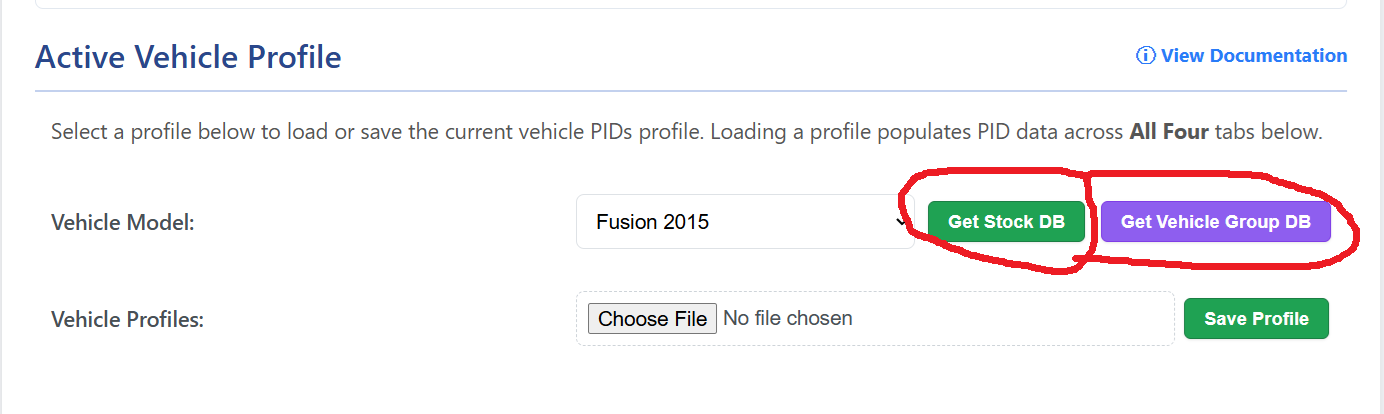
The WiCAN Web UI now supports dual-ecosystem cloud fetching, allowing you to seamlessly switch between the stock firmware database and the new grouped community database.
- Vehicle Model Dropdown: This list displays the vehicle profiles available to load into your workspace. Selecting a model will fetch its data and render the PIDs and Groups on your screen.
- Get Stock DB: Connects to the official meatpiHQ GitHub repository and downloads the legacy monolithic database. This contains the original, factory-verified flat PID profiles.
- Get Vehicle Group DB: Connects to the new community-driven wambs repository. This database uses a lightning-fast indexed menu. When clicked, it instantly updates your dropdown list without freezing the browser. The actual vehicle data is "lazy-loaded"—meaning the WiCAN only downloads the specific car's data from GitHub at the exact moment you select it from the dropdown.
2. Profile Management
- Save Profile: Exports your current configuration (including custom PIDs and Vehicle Groups) as a unified
.jsonfile to your computer.- YAML Bundling: During the save process, the UI will prompt you and ask if you want to bundle a Home Assistant YAML file with your profile. This allows you to share both your WiCAN polling logic and your Home Assistant entities associate with the PIDs in a single file.
- Choose File (Upload): Allows you to manually upload a
.jsonprofile shared by the community or one you previously backed up to your computer.
3. Home Assistant YAML Integration
The new WiCAN JSON profile format acts as a "briefcase," safely transporting extra metadata without interfering with the WiCAN's internal C-firmware.
- Auto-Extraction: When you fetch the Vehicle Group DB and select a community profile from the dropdown, the Web UI automatically checks if the creator bundled a Home Assistant YAML file inside it.
- If a YAML configuration is detected, the browser will automatically extract the code and trigger a background download of a ready-to-use
ha_sensors_[vehicle_name].yamlfile straight to your computer.
4. The Smart Merger Logic
When you attempt to load or upload a new profile while you already have data in your workspace, the WiCAN Pro will prompt you with a Conflict Resolver. This prevents accidental data loss:
- Replace Entirely: Wipes all current PIDs, Groups, and Filters and replaces them with the new file. Use this when switching to a completely different vehicle.
- Merge Into Current: Keeps your existing custom PIDs and Groups but adds any new ones found in the profile. If a PID with the same name exists, the version in the new file typically takes precedence.
5. Automatic Loading
The WiCAN Pro remembers the last active profile. Upon power-up, it will automatically load the selected profile and begin the Automate polling sequence based on the Low-Voltage Behavior settings.
6. Community Contributions
The WiCAN ecosystem thrives on user-shared profiles. Because the new wambs repository is fully automated via GitHub Actions, any new profiles or updates pushed to the community repository are instantly indexed and made available to all users via the Get Vehicle Group DB button. If you have successfully grouped PIDs or built a great Home Assistant dashboard, save your bundled profile and submit it to the repository to help the community!