Low-Voltage Behavior
The Low-Voltage Behavior field is a battery protection feature designed to prevent the WiCAN from draining your vehicle's 12V battery while the car is parked or turned off.
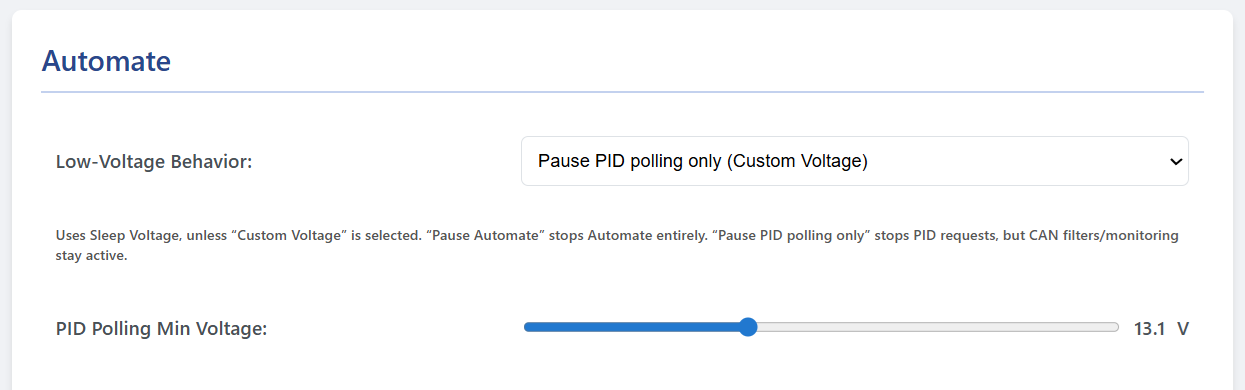
When the WiCAN actively polls the vehicle for data (by sending OBD2 PID requests), it forces the car's Engine Control Unit (ECU) to stay awake. An awake ECU consumes significantly more power than a sleeping one. This setting tells the Automate engine when to back off and let the car sleep based on the battery voltage.
Here is exactly what each of the four options does:
1. Disable
- Behavior: The Automate engine completely ignores battery voltage.
- Use Case: Only use this for bench testing or if the device is plugged into a dedicated power supply. If left in a real car, it will continuously poll the ECU and eventually drain the 12V battery.
2. Pause Automate on low voltage (Sleep Voltage)
- Behavior: When your battery drops below the Sleep Voltage (which you configure over on the Power Saving tab), the entire Automate engine shuts down. It stops polling PIDs, stops listening to CAN filters, and stops publishing to MQTT.
- Use Case: The most aggressive power-saving mode. Use this if you want the WiCAN to go completely dormant the moment the car shuts off.
3. Pause PID polling only (Sleep Voltage)
- Behavior: When the battery drops below the Sleep Voltage (from the Power Saving tab), the WiCAN stops actively asking the ECU for PID data, but it keeps its "ears" open. Passive CAN Filters and monitoring remain active, and it will still publish data to your destinations if the car broadcasts it.
- Use Case: Ideal if your car passively broadcasts data on the CAN bus while off (like charging status on an EV) and you want to capture it, but you don't want to actively ping the ECU and waste power.
4. Pause PID polling only (Custom Voltage)
- Behavior: This does the exact same thing as Option 3 (pauses active PIDs but keeps passive CAN filters running), but it decouples the trigger from the Power Saving tab. Selecting this reveals a new slider called PID Polling Min Voltage.
- Use Case: Use this when you want fine-grained control. For example, you might want the WiCAN device itself to stay fully awake and connected to Wi-Fi down to 12.2V (Sleep Voltage), but you want it to stop actively bothering the car's ECU at 13.0V (Custom Voltage) the moment the alternator stops charging.